OPS PC project requirement planning
Buyer worksheet · Configuration intent

OPS PC RFQ Specification Worksheet

A quotation becomes more useful when the buyer's display, workload, interface, documentation, and delivery requirements are stated together. Use this worksheet to collect project inputs before asking a supplier to confirm a sample or bulk configuration.

9 min readPublished 15 August 2026By ShenzhenOPS

What this worksheet does — and does not do

This is a buyer requirement collection tool. It does not define a universal OPS PC specification, recommend a fixed processor, promise compatibility, set a price, or confirm certification. It helps a buyer describe the project clearly enough for a supplier to evaluate the requested configuration.

Where a requirement depends on the CPU platform, motherboard version, display model, software image, market, or project conditions, record that dependency instead of forcing a single answer. Final specifications should be confirmed against the selected sample and commercial documentation before a bulk order.
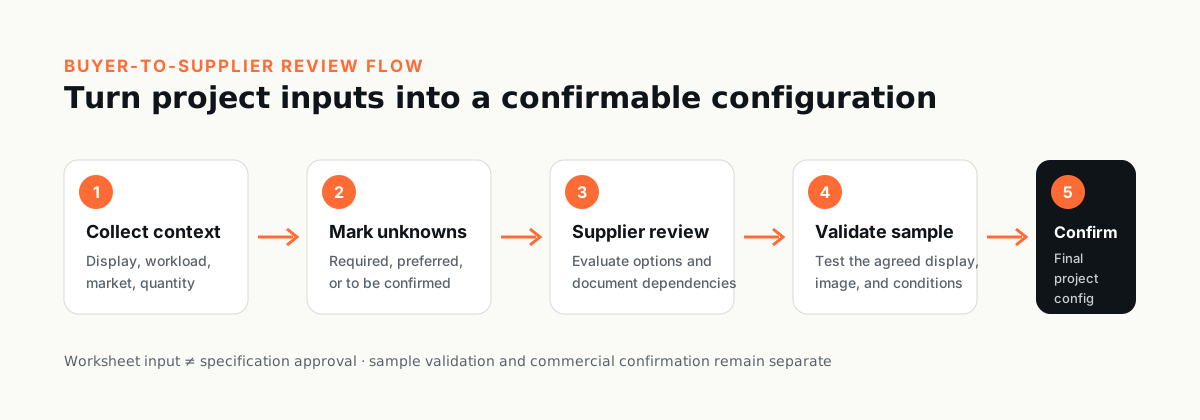
Five-step OPS PC RFQ process from buyer inputs to final configuration confirmation
Keep buyer inputs, supplier evaluation, sample validation, and final configuration confirmation as separate checkpoints.
Start with what is known

You do not need to complete every field. Send what you know and we can help confirm the remaining configuration.

If the target display or system model is already selected, include its full model and interface information. If it is not selected, write “to be confirmed” and describe the use case. Do not guess a slot, connector, power, firmware, or compatibility detail.

The CSV remains available as an optional working asset if your team prefers a structured file.

Quick RFQ Checklist

For an initial review, send the items you already know. “To be confirmed” is a valid starting point for anything still open.

  • Project or applicationDescribe the use case and deployment setting.
  • Target display or systemShare the brand, full model, revision, manual, or photos if available.
  • OPS / OPS-C contextProvide the known slot, connector, or interface information, or mark it to be confirmed.
  • Main workload and softwareList the applications, content, operating system, or buyer image involved.
  • Memory and storage preferenceShare required capacities or leave the configuration open for review.
  • Display, USB, touch, and peripheralsList the functions and counterpart devices the project needs.
  • Network, wireless, and security needsNote the required connections, management, or security policy.
  • Target market and documentsIdentify the destination market and any required certification or document set.
  • Quantity and desired timelineInclude sample quantity, bulk estimate, and target dates if known.
  • Branding or other customizationDescribe logo, packaging, firmware, software-image, or other project requests.

Advanced Project Requirements

Use the complete 30-field worksheet when your team has detailed technical, commercial, documentation, or validation inputs. It is optional for the first contact and can be completed progressively.

Advanced Project Requirements — 30-field worksheet

Complete known fields, mark unknown fields clearly, and attach display or project documents where available.

1. Project, display, and mechanical context

Establish where the module will be used and what physical system it must be evaluated against.

Field
What the buyer provides
Why it matters
Project / application
Use case, deployment setting, user type, and operating pattern.
Frames workload, lifecycle, environmental, and support questions.
Target display or system
Brand, full model, revision if known, and relevant manuals or photos.
Allows model-specific interface and integration review; no compatibility should be inferred without evidence.
OPS or OPS-C status
Known standard, slot type, connector details, or “not yet confirmed.”
Prevents an assumed mechanical or electrical standard from becoming a purchase requirement.
Mechanical constraints
Available slot or enclosure dimensions, insertion depth, service access, locking needs, and cable clearance.
Helps identify fit, installation, and maintenance constraints for the selected design.

2. Workload, memory, storage, and software

Describe the intended work instead of selecting components by name alone.

Field
What the buyer provides
Why it matters
Workload
Applications, content type, resolution targets, conferencing, classroom, signage, kiosk, or other tasks.
Creates a basis for configuration review without assuming a processor or performance level.
Memory requirement
Capacity target, minimum, upgrade preference, and any application dependency.
Memory type and capacity options depend on CPU platform, motherboard version, and selected configuration.
Storage requirement
Capacity, workload, retention needs, serviceability preferences, and image size.
Supports capacity and service planning without assuming a particular drive or interface.
Operating system
Required OS, edition, language, licensing responsibility, update policy, and recovery expectations.
Clarifies software-image, driver, licensing, and validation responsibilities.
Software image
Applications, device management, security tools, codecs, kiosk settings, and buyer-provided image process.
Helps define who builds, validates, signs off, and maintains the deployment image.

3. Display output, USB, touch, and peripherals

List required functions and counterpart devices; connector availability alone does not prove end-to-end operation.

Field
What the buyer provides
Why it matters
Display outputs
Target display path, resolution, refresh needs, number of displays, and any external output requirement.
Supports platform- and display-specific validation rather than a cross-model assumption.
USB and peripherals
Peripherals, interface types, port quantity, power needs, and simultaneous-use requirements.
Allows port mapping, bandwidth, power, and driver checks for the intended system.
Touch requirement
Touch display model, touch interface, operating system, gesture or multi-touch need, and validation method.
Touch behavior depends on the display, interface, driver, OS, and selected configuration.
Other interfaces
Serial, audio, camera, sensor, GPIO, or other project interfaces and protocols.
Identifies project-specific I/O that must be confirmed instead of extrapolated from another model.

4. Network, wireless, security, and firmware

State policy and integration requirements, including who owns credentials and configuration.

Field
What the buyer provides
Why it matters
Wired network
Network topology, speed target, addressing, VLAN, wake, manageability, or redundancy needs.
Determines which network features require model- and OS-level confirmation.
Wireless
Wi-Fi and Bluetooth needs, regional constraints, antenna placement, and buyer network policy.
Wireless options and approvals can vary by module, market, antenna, and selected configuration.
TPM and security
TPM, secure boot, encryption, credential, device-management, or hardening requirements.
Separates buyer security policy from hardware or firmware features that still require confirmation.
Firmware / BIOS
Boot behavior, power recovery, scheduled startup, logo, password, update, and ownership requirements.
Defines firmware acceptance criteria and avoids assuming a feature is available on every motherboard version.

5. Power, thermal, and environment

Capture real installation conditions, not only room temperature or a generic duty statement.

Field
What the buyer provides
Why it matters
Power context
Display or system power source, available documentation, startup behavior, and local power conditions.
Supports system-level power review and prevents unverified connector or budget assumptions.
Thermal context
Ventilation, slot orientation, enclosure restrictions, duty cycle, and expected concurrent workload.
Thermal behavior depends on the full system, ambient conditions, workload, and selected configuration.
Environment
Ambient range, humidity, dust, vibration, altitude, indoor or outdoor use, and cleaning practices.
Flags conditions that may require additional engineering review or a different product category.

6. Market, certification, and documents

Ask for the documents the project requires; do not assume a mark shown elsewhere applies to this model or transaction.

Field
What the buyer provides
Why it matters
Target market
Countries or regions of sale and installation, importer role, and customer-specific rules.
Defines which legal, labeling, language, and commercial reviews may apply.
Certification requirement
Required scheme, product/model scope, applicant or holder expectations, market, and deadline.
Certification must be checked against the specific model, certificate, holder, validity, and intended market.
Required documents
Datasheet, declaration, report, certificate, manual, packing list, invoice fields, HS-code review, or other records.
Clarifies the exact document set and which items need supplier, buyer, or third-party confirmation.

7. Branding, quantity, timeline, and delivery

Separate buyer intent from supplier confirmation and final commercial terms.

Field
What the buyer provides
Why it matters
OEM branding
Logo location, artwork format, label, boot logo, SKU naming, packaging, and confidentiality needs.
Defines the branding scope that requires artwork, engineering, and commercial review.
Sample quantity
Requested evaluation quantity, sample purpose, acceptance owner, and test plan.
Connects the sample to explicit validation and sign-off criteria.
Bulk quantity
Initial and forecast quantities, shipment splits, and whether the forecast is firm or indicative.
Supports commercial and production planning without treating a forecast as a commitment.
Timeline
Required sample date, evaluation window, decision date, and desired delivery window.
Lets the supplier confirm feasibility; it is not a lead-time promise.
Packaging and delivery
Individual or project packaging, labels, carton marks, accessories, manuals, destination, and shipping responsibility.
Prevents packaging, documentation, and handoff requirements from being discovered after configuration approval.
Other customization
Chassis, port, firmware, software-image, accessory, documentation, or process requests not covered above.
Creates a visible review list for project-based configuration rather than an implied standard feature.
Final confirmation
Selected CPU platform, motherboard version, display or host system, software image, interfaces, project conditions, market requirements, approved sample, and commercial documents.
Records the project-specific confirmation checkpoint before a bulk order.

How to turn the worksheet into a useful RFQ

  1. Attach evidence. Include the target display manual, photos, interface diagrams, software requirements, and market document list where available.
  2. Label uncertainty. Use “unknown,” “buyer to confirm,” or “supplier to evaluate” rather than filling gaps with an assumed specification.
  3. Separate required from preferred. A supplier can then propose alternatives without silently removing a mandatory item.
  4. Define sample acceptance. State who tests the sample, which display and software image will be used, and what evidence closes each requirement.

Final confirmation checkpoint

Before a bulk order, confirm the final model and configuration against the selected CPU platform, motherboard version, display or host system, software image, interfaces, project conditions, market requirements, approved sample, and commercial documents.

The completed worksheet is an input to evaluation; it is not itself a specification approval, compatibility certificate, compliance decision, quotation, or purchase order.

Useful references before you send the worksheet

Review the current product catalog to identify candidate product families, use the datasheet library as versioned reference material, and read the display compatibility review process before treating a display match as confirmed. For branding and project requests, the OEM/ODM overview explains the existing inquiry path.

Ready to send what you know?

You do not need to complete every field. Send what you know and we can help confirm the remaining configuration.

Send Your Requirements