OPS is an open Intel standard. In principle, any commercial display with a standard OPS slot can accept your OPS module — regardless of the display brand. What actually decides fit is three things about your specific display:
1. Does it have an OPS slot? 2. Which connector standard (the OPS 80-pin JAE connector)? 3. Which size — standard OPS (30 mm) or OPS-C (42 mm)?
Below is a brand-by-brand quick-reference matrix, followed by how to confirm your exact model. When in doubt, send us your display brand and model and we'll confirm it for you.
Why "standard" means cross-brand compatible
OPS stands for Open Pluggable Specification — an open standard Intel introduced so that a single slot-in computing module could work across displays from different manufacturers. The two things that make it a standard are physical and electrical:
- A defined 80-pin JAE (TX25) connector that carries power, video, USB, and control signals between the module and the display.
- A defined module size and slot geometry, so a compliant module physically seats into a compliant slot.
Because Intel defines both, a display that is genuinely OPS-compliant should accept any OPS-compliant module that matches its size — which is exactly why this is a cross-brand standard rather than a per-vendor lock-in. (For the fundamentals, see our guide to what an OPS PC is.)
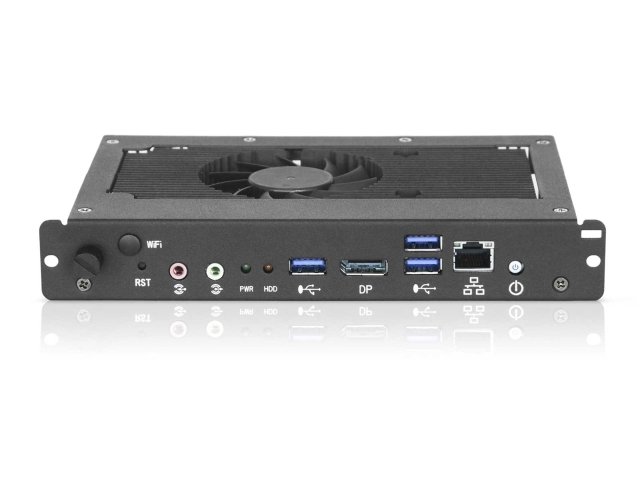
Once the module is seated in the bay, its front I/O panel stays accessible outside the display — so WiFi antennas, USB, DisplayPort, and LAN remain usable for setup and servicing without removing the module.
Display brand compatibility matrix
The matrix below groups the main brands into commercial displays (digital signage) and education interactive flat panels (IFP) — the two deployment types most buyers ask about. Each entry reflects whether the brand offers OPS-compliant models that can accept a standard OPS module, based on the manufacturer's own public materials.
One reading of the matrix matters most: an entry of "Yes" describes the brand's OPS-compliant models, not every product they sell. Within any brand, some models ship with an OPS slot and some don't, and the form factor (standard OPS vs OPS-C) can differ between model lines. That's why the last step is always to confirm your exact model.
How to confirm your exact display model
You can verify compatibility yourself from the display's own spec sheet or manual. Look for these four things:
- An OPS slot. The spec sheet should mention an "OPS slot," "OPS-compliant," "Option slot," or a slot-in PC option. No slot means no internal OPS module — full stop.
- The connector. Genuine OPS uses the 80-pin JAE (TX25) connector. If the spec names a different or "proprietary" connector, treat it as a non-standard variant until confirmed.
- The size. Confirm whether the slot takes standard OPS (30 mm) or OPS-C (42 mm). They are not interchangeable — a deeper module won't fit a shallower bay, and a standard module won't seat correctly in an OPS-C bay.
- Power budget. Higher-TDP modules (i7, AI/NPU) draw more; check the slot's rated power so the display can actually feed the module you choose.
Common compatibility pitfalls
A handful of avoidable mistakes account for most "it didn't fit" surprises:
- "OPS" that's actually a proprietary variant. A few displays advertise an OPS-style slot but use a non-standard connector or chassis. The fix is the spec check above — confirm the 80-pin JAE connector, not just the word "OPS."
- Size mismatch: OPS-C 42 mm vs standard OPS 30 mm. This is the single most common error. The connector is the same, but the chassis depth isn't, so the module physically won't seat. If you're unsure which your project needs, see OPS vs OPS-C, and note our OPS-C 42 mm module for the deeper bays.
- Newer displays moving from OPS to SDM. Some manufacturers — Sharp NEC has stated this publicly — are adopting Intel's newer SDM (Smart Display Module) on newer products while older models stay on OPS. So a brand can be "OPS" on a 2021 display and "SDM" on its 2025 replacement. Check the specific model's generation, not just the brand.
The honest boundary — and how we help
OPS is a standard, but compatibility is ultimately confirmed at the level of a specific module in a specific display. Even the display makers say so: SMART, for example, supports OPS and OPS-C modules but notes that third-party OPS modules can behave differently and should be compatibility-tested. That's the correct instinct, not a red flag — it's how a healthy standard works in the real world.
So rather than claim a module "works with any display," we do the model-by-model check the display makers themselves recommend. Send us your display brand and exact model, and our engineers will confirm the fit — slot, 80-pin connector, and size — before you commit to an order.
For reference on our side: our SZO OPS modules are built to the standard OPS interface (80-pin JAE connector), in standard OPS (30 mm) and OPS-C (42 mm) form factors. [Vincent to confirm exact wording of our product's standard-OPS claim before publishing.] You can browse the range on our products page.
Not sure if your display takes our module?
Send us your display brand and exact model — we'll confirm OPS slot, connector, and size, and recommend the right SZO configuration.
Check my display on WhatsApp →