What this worksheet does — and does not do
This is a buyer requirement collection tool. It does not define a universal OPS PC specification, recommend a fixed processor, promise compatibility, set a price, or confirm certification. It helps a buyer describe the project clearly enough for a supplier to evaluate the requested configuration.
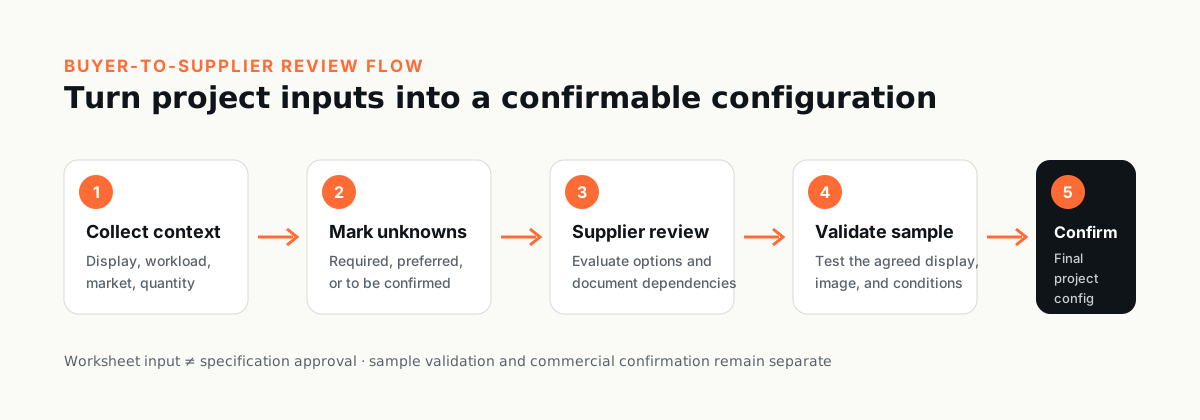
Where a requirement depends on the CPU platform, motherboard version, display model, software image, market, or project conditions, record that dependency instead of forcing a single answer. Final specifications should be confirmed against the selected sample and commercial documentation before a bulk order.
You do not need to complete every field. Send what you know and we can help confirm the remaining configuration.
If the target display or system model is already selected, include its full model and interface information. If it is not selected, write “to be confirmed” and describe the use case. Do not guess a slot, connector, power, firmware, or compatibility detail.
The CSV remains available as an optional working asset if your team prefers a structured file.
Quick RFQ Checklist
For an initial review, send the items you already know. “To be confirmed” is a valid starting point for anything still open.
- Project or applicationDescribe the use case and deployment setting.
- Target display or systemShare the brand, full model, revision, manual, or photos if available.
- OPS / OPS-C contextProvide the known slot, connector, or interface information, or mark it to be confirmed.
- Main workload and softwareList the applications, content, operating system, or buyer image involved.
- Memory and storage preferenceShare required capacities or leave the configuration open for review.
- Display, USB, touch, and peripheralsList the functions and counterpart devices the project needs.
- Network, wireless, and security needsNote the required connections, management, or security policy.
- Target market and documentsIdentify the destination market and any required certification or document set.
- Quantity and desired timelineInclude sample quantity, bulk estimate, and target dates if known.
- Branding or other customizationDescribe logo, packaging, firmware, software-image, or other project requests.
Advanced Project Requirements
Use the complete 30-field worksheet when your team has detailed technical, commercial, documentation, or validation inputs. It is optional for the first contact and can be completed progressively.
Advanced Project Requirements — 30-field worksheet
Complete known fields, mark unknown fields clearly, and attach display or project documents where available.
1. Project, display, and mechanical context
Establish where the module will be used and what physical system it must be evaluated against.
2. Workload, memory, storage, and software
Describe the intended work instead of selecting components by name alone.
3. Display output, USB, touch, and peripherals
List required functions and counterpart devices; connector availability alone does not prove end-to-end operation.
4. Network, wireless, security, and firmware
State policy and integration requirements, including who owns credentials and configuration.
5. Power, thermal, and environment
Capture real installation conditions, not only room temperature or a generic duty statement.
6. Market, certification, and documents
Ask for the documents the project requires; do not assume a mark shown elsewhere applies to this model or transaction.
7. Branding, quantity, timeline, and delivery
Separate buyer intent from supplier confirmation and final commercial terms.
How to turn the worksheet into a useful RFQ
- Attach evidence. Include the target display manual, photos, interface diagrams, software requirements, and market document list where available.
- Label uncertainty. Use “unknown,” “buyer to confirm,” or “supplier to evaluate” rather than filling gaps with an assumed specification.
- Separate required from preferred. A supplier can then propose alternatives without silently removing a mandatory item.
- Define sample acceptance. State who tests the sample, which display and software image will be used, and what evidence closes each requirement.
Final confirmation checkpoint
Before a bulk order, confirm the final model and configuration against the selected CPU platform, motherboard version, display or host system, software image, interfaces, project conditions, market requirements, approved sample, and commercial documents.
The completed worksheet is an input to evaluation; it is not itself a specification approval, compatibility certificate, compliance decision, quotation, or purchase order.
Useful references before you send the worksheet
Review the current product catalog to identify candidate product families, use the datasheet library as versioned reference material, and read the display compatibility review process before treating a display match as confirmed. For branding and project requests, the OEM/ODM overview explains the existing inquiry path.
Ready to send what you know?
You do not need to complete every field. Send what you know and we can help confirm the remaining configuration.
Send Your Requirements →