Start with document identity, not the largest number
A comparison should begin by identifying each source: document title, product or series, revision or date, source owner, and the configuration it describes. A newer date does not automatically make an older document false, and a higher value in one document does not automatically apply to another version.
The safe question is: “Which document and configuration does this statement belong to?” Keep every value attached to that evidence until a supplier confirms that the two documents describe the same platform and motherboard version.
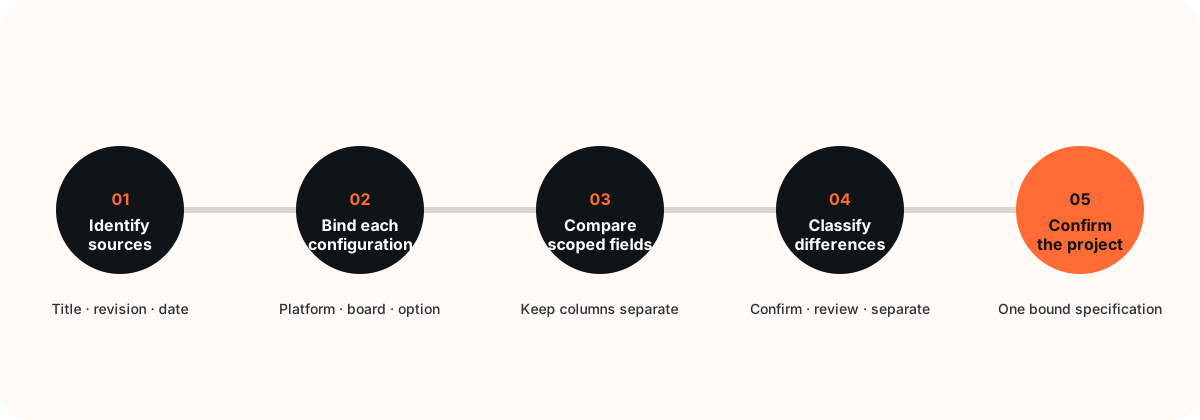
Do not copy the preferred value from each datasheet into one combined row.
CPU, motherboard, memory, storage, I/O, display, operating system, firmware, and certification evidence remain configuration-dependent until their relationship is confirmed. Final specifications should be confirmed for the selected project configuration before a sample or bulk order.
A seven-field comparison template
Use one column per document. Add a third column for the buyer's decision status; do not use it to invent a resolved value.
OPS datasheet version comparison
Record what each document actually says, then mark what still needs confirmation.
| Comparison field | Document A | Document B | Decision status |
|---|---|---|---|
| Source identity | Title, owner, document code, revision, and date. | Title, owner, document code, revision, and date. | Same source family, different revision, or unrelated source? |
| Product binding | Series, model, CPU platform, motherboard version, and named configuration. | Series, model, CPU platform, motherboard version, and named configuration. | Comparable only after the binding is established. |
| Memory and storage | Record the stated options and their conditions without expanding them. | Record the stated options and their conditions without expanding them. | Configuration-dependent; do not merge option lists. |
| I/O and display | Record ports, display paths, and counterpart conditions exactly as scoped. | Record ports, display paths, and counterpart conditions exactly as scoped. | Check board, chassis, firmware, display, and project dependencies. |
| OS and firmware | Record edition, version, image, driver, and firmware context if stated. | Record edition, version, image, driver, and firmware context if stated. | Unknown fields stay unknown until validated. |
| Compliance documents | Record certificate or report identifier, holder, model coverage, market, and validity if available. | Record certificate or report identifier, holder, model coverage, market, and validity if available. | Never extend one certificate to another model or entity. |
| Project conclusion | List open questions, required evidence, and the sample configuration to validate. | Confirmed, configuration-dependent, review required, or not comparable. | |
Use four decision labels
The source and supplier confirm that both statements refer to the same bound platform and configuration.
Different values may both be valid because the CPU platform, motherboard version, option, or project requirement differs.
The documents appear to overlap, but the available evidence does not establish why the values differ.
The documents describe different products, markets, test conditions, or evidence classes and should remain separate.
How to handle common differences
DDR4 and DDR5 references
DDR4 and DDR5 options may legally coexist across OPS configurations. Treat memory type as dependent on CPU platform, motherboard version, and the selected configuration. Do not label one document wrong merely because another document shows a different memory generation.
Port and display differences
A port name alone does not prove the same signal path, display behavior, simultaneous-use condition, or chassis exposure. Keep the I/O statement tied to its board, chassis, firmware, and project context until confirmed.
Operating system and certification differences
OS support can depend on hardware, firmware, drivers, image ownership, edition, and review date. Certification evidence must remain tied to its holder, covered model, market, certificate, and validity. Neither category should be copied across a product family.
Evidence pack to request
- Full datasheet files, not cropped screenshots.
- Document code, revision, date, and source owner.
- Exact product or series and the proposed configuration.
- CPU platform and motherboard version where applicable.
- Photos or drawings that identify the relevant chassis and interfaces.
- OS image, firmware, driver, display, and test context where relevant.
- Certificate or report identifier, holder, model coverage, market, and validity when compliance is in scope.
- A written list of which values require supplier confirmation.
Turn the comparison into a project decision
- Freeze the source set. Name the documents used for the review.
- Separate each configuration. Create additional columns rather than combining values.
- Mark uncertainty. Use “unknown” or “review required” instead of an assumed answer.
- Choose a sample configuration. Bind the review to one proposed platform, motherboard, and project requirement set.
- Confirm the final specification. Record the supplier-confirmed configuration and the documents that support it before bulk ordering.
This comparison method does not certify compatibility, establish current availability, approve a specification, or validate a certificate. It organizes evidence so the responsible parties can resolve the right questions.
Review the available source documents
Use the datasheet library as versioned reference material, then ask for confirmation against the exact platform and project configuration you intend to evaluate.
Browse Datasheets →