If you are deploying digital signage, one of the first hardware decisions is how to power the screen. There are three approaches, and the right one depends entirely on your content and how critical uptime is. Here is a straight comparison from a manufacturer that builds for all three scenarios.
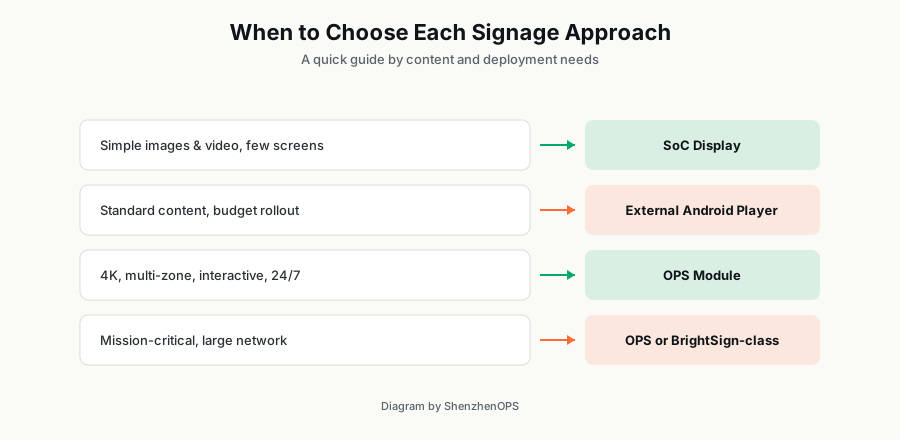
SoC display: the all-in-one
System-on-Chip displays build the player into the screen itself (LG webOS, Samsung Tizen). There is no separate box, no extra cabling, and nothing extra to mount. For simple content — image loops, basic video — on a modest number of screens, it is the cleanest and cheapest option.
The limit is processing power. SoC chips are deliberately modest, so they struggle with 4K multi-zone layouts, heavy interactivity, or data-driven content. And when the player is built into the screen, upgrading the "computer" means replacing the whole display.
External media player: the flexible middle
A separate box connected by HDMI. Android players dominate here on value and software support; dedicated players like BrightSign serve the mission-critical end. You can upgrade the player without touching the screen, and swap it across displays.
The downside is physical: an extra device to mount, power, and cable behind every screen. Across hundreds of locations, that cabling and the box itself become a management and failure-point consideration.
OPS module: power without the clutter
An OPS PC slides into a standardized bay inside the display and connects through a single connector — combining the cable-free cleanliness of SoC with the power and upgradeability of an external player. You get full Intel CPUs, and servicing is trivial: pull the module out of the slot and replace it in seconds, without dismounting the screen.
The requirement is a display with an OPS slot (common on commercial interactive panels). If your displays have the slot, OPS is usually the best balance of power, serviceability, and tidiness.
Total cost over time, not just unit price
The cheapest player at purchase is often the most expensive over a deployment's life. Factor in failure rates under continuous duty, the labor to access and replace a unit, and how easily you can standardize and remotely manage the fleet. An OPS module that swaps in 30 seconds can be cheaper to operate than a $40 box bolted behind a wall-mounted screen.
We help buyers run that comparison for their specific rollout. Tell us your screen count, content type, and where the displays live, and we will lay out the realistic options.