The display gets the attention, but the media player is what actually makes digital signage work. It is the device that pulls content from your CMS, stores it, decodes it, and pushes it to the screen — around the clock. Choose the wrong one and you get frozen screens, stuttering video, and constant IT call-outs. As a manufacturer that builds signage-grade hardware, here is how to choose well in 2026.
What a media player actually does
A digital signage media player is a small computer dedicated to one job: reliable playback. It downloads content from your content management system, caches it locally so it keeps playing if the network drops, decodes images and video, and outputs to one or more displays over HDMI or DisplayPort — on a continuous loop, often 16-24 hours a day.
That "continuous" part is the whole point. A consumer streaming stick can show a slideshow, but it is not built to run for years without a reboot. Commercial signage hardware is.
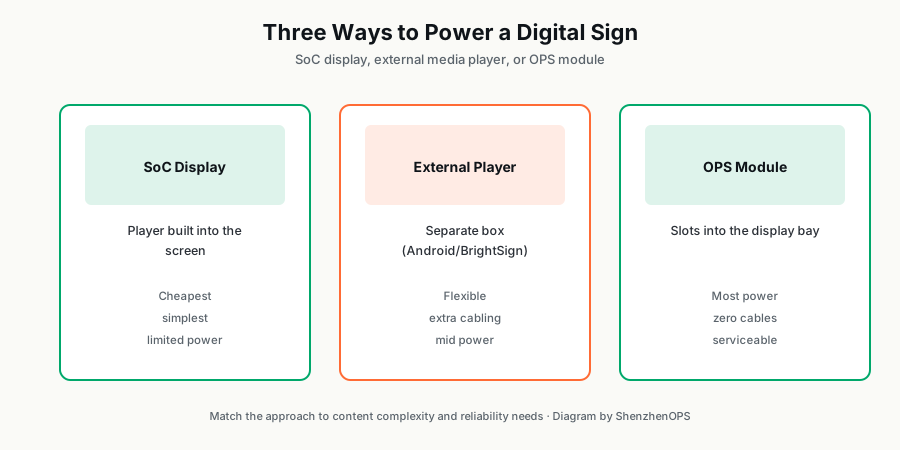
The three main approaches
1. System-on-Chip (SoC) displays
The player is built into the screen (LG webOS, Samsung Tizen). Cheapest and simplest — no external box. But the processor is modest, so SoC hits a ceiling fast once content gets complex (multi-zone layouts, heavy 4K, interactivity). Best for simple image and video loops.
2. External media players
A separate box next to the display. Android players dominate this tier — over 72% of new signage networks now use Android or ARM-based players because they are inexpensive and widely supported. Purpose-built players like BrightSign (2M+ units deployed) sit at the premium, mission-critical end. The trade-off is an extra device and cabling to manage.
3. OPS modules
An OPS PC slides into a bay inside the display, connecting through a single connector — no external box, no cable clutter. It offers the most processing power (full Intel desktop/mobile CPUs) and is the easiest to service: pull the module, swap it, done. Best for 4K, multi-zone, interactive, and 24/7 deployments.
What to actually check on the spec sheet
- Processor: At least a quad-core ARM or x86 chip for smooth 4K and multi-zone. SoC chips handle basic content but struggle under load.
- RAM: 2 GB minimum for basic signage; 4-8 GB+ for 4K and interactive content.
- 4K output: Commercial displays increasingly ship at 4K — a player capped at 1080p is a future bottleneck.
- Operating hours rating: Confirm the unit is rated for the daily hours you need. 24/7 is a different spec from 8 hours.
- OS and CMS compatibility: Windows offers the most power and remote-management options; Android offers value; make sure it runs your signage software.
- Remote management: For more than a handful of screens, remote monitoring and updates are essential.
Which should you choose?
Match the hardware to the content, not the other way around. Simple loops on a few screens: SoC is fine. Standard content on a budget rollout: an Android player. 4K, multi-zone, interactive, or mission-critical 24/7 across many locations: an OPS module or a premium dedicated player.
We build OPS modules and mini PCs specifically for signage duty, in configurations from entry-level N100 up to Core i7. If you are speccing hardware for a signage rollout, tell us the content type and screen count and we will recommend the right tier — no overselling.
Speccing hardware for a signage rollout?
Tell us your content type, screen count, and resolution, and our engineers will help you choose the right OPS module or player tier for the job — no overselling.
Ask on WhatsApp →